![logo.png]](https://support.talkatoo.com/hs-fs/hubfs/Talkatoo%20Marketing%20Assests/Logo/logo.png?height=32&name=logo.png)
Subscription Seats
Recently we introduced new subscription types that are the default for all new users. When you sign up for Talkatoo, you choose either Ultimate, which is all of our features, or Notes Only, which only grants access to some limited features.
Anyone that signed up before these plans were introduced this fall, and has not yet upgraded, is on a Legacy Seat, which grants access to most features, but not all.
| Notes Only | Legacy* | Ultimate |
| Auto-SOAP notes | Auto-SOAP notes | Auto-SOAP notes |
| Default Templates | Default Templates | Default Templates |
| Desktop Dictation |
Desktop Dictation |
Desktop Dictation |
| AI Assistant |
AI Assistant |
AI Assistant |
| Call Summary (Callbacks) | Call Summary (Callbacks) | Call Summary (Callbacks) |
| AI Assistant within Notes | AI Assistant within Notes | AI Assistant within Notes |
| Custom Templates | Custom Templates | Custom Templates |
| Auto Custom Template Builder | Auto Custom Template Builder | Auto Custom Template Builder |
| Macros (Talkatext) | Macros (Talkatext) | Macros (Talkatext) |
| Medical History Summarizer | Medical History Summarizer | Medical History Summarizer |
| Unlimited Support Staff | Unlimited Support Staff | Unlimited Support Staff |
| All Upcoming Features | All Upcoming Features | All Upcoming Features |
*Legacy is no longer available for purchase.
Ultimate
Ultimate is the full Talkatoo experience that includes all of the features, and is the only one to include Medical History, Support Seats, and all upcoming features.
Support Seat
Ultimate plans come with unlimited, free Support Seats.
Support Seats allow your techs/support staff to be able to use Talkatoo in a complementary way to the DVMs in the clinic.
They can record notes, dictate, use the assistant and have access to Call Summary and Auto Follow-up. Note that Call Summary and Auto Follow-up now consume credits for Support Users. Learn more.
With the Power Editor permission, they can also see and manage the notes for the DVMs on the subscription. A Support Seat is not required for Power Editor.
Notes Only
Notes only is our low-cost plan that allows you access to our default note templates. You can customize them within the settings, but you don't have access to our custom note templates, nor to many of the other great features.
Legacy
Legacy plans are what we call the older plans not yet on Ultimate, and are no longer available. They have access to most features, with the notable exception of Support Seats and Document Upload/Summary. Note that making any changes, including upgrading or downgrading users, will result in your subscription migrating to Ultimate. Reach out to our Customer Success team for any questions or concerns.
None
None means the user does not count against your paid licenses. You can still grant them permissions like User or Billing Management, or Power Editor.
When you invite a new user, or want to modify an existing user, you have to choose the Seat Type, which will be Ultimate, Support, Notes Only or None, or if you are still on the legacy plan, Legacy or None.
You can then apply permissions separately, regardless of the Seat.
Permissions

Permissions are now handled separately from the seat that controls most of the functionality of a user.
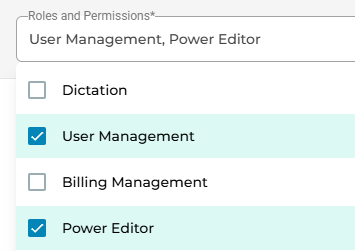
When you invite a user, you can choose to grant them additional permissions. You can assign any combination of User Management, Billing Management, and Power Editor to ensure you get the most of out your licenses.
| Permission | Use |
| User Management | Invite users and manage their permissions |
| Billing Management | See and manage subscription, view billing history |
| Power Editor (new) | Allows this user to see all notes created by all users on this subscription (visible in the portal, not the desktop app). |
Ultimate/Legacy/Notes Only are the paid seats and correspond to the number of licenses you have purchased. All others (Support/None) do not count against that number. You would only ever see 1 of these 3 options, depending on your plan.
User or Billing Management are helpful for an accountant or manager who won't be dictating but needs to be able to invite users, or to manage payments and view invoices. As long as they do not also have a Paid Seat, this will not count against your licenses. You can have as many of these as you need.
Power Editor is a new role that allows a user to see all notes created, including drafts, for all users on the same subscription. This is helpful for when a tech or other clinic member needs access to notes from the other users recording notes through Talkatoo, without having to share their login, or in the case of multiple doctors, signing in and out all the time. This allows them to reference, edit and copy the notes into the practice management system.
Simply invite them like this, for example:
If you discover any issues or errors in the administration portal, we would be grateful if you let us know by sending an email to support@talkatoo.com